
Don't have a myTNB account yet?
You can register a myTNB account through the official TNB portal to access myTNB services using your account.
This guide explains how to register a myTNB account step by step, including email registration, personal details, OTP and email verification.
👉 Open the official myTNB registration page
How to Register a myTNB Account
Note: The screenshots below use the myTNB web portal. If you are using the myTNB app, the interface or location of certain options may be different. Follow the latest instructions displayed in myTNB.
Step 1 – Open the Official myTNB Portal
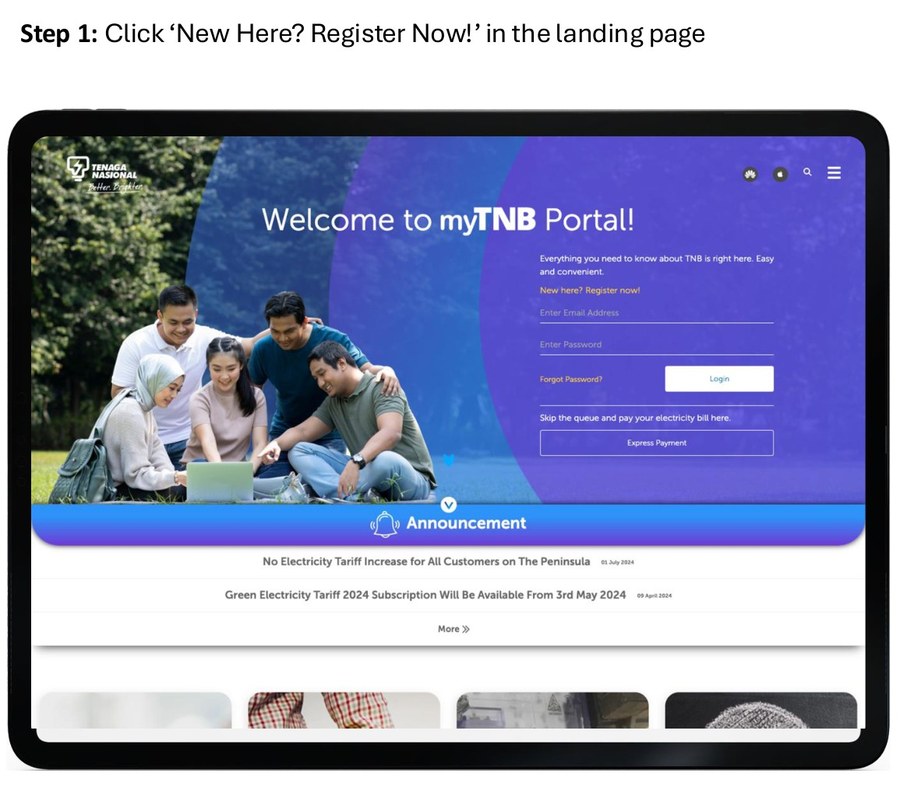
Open the official myTNB portal. If you are on the login page and do not have an account, select New Here? Register Now! to begin registration.
👉 Open the official myTNB portal
Step 2 – Enter Your Email Address and Password
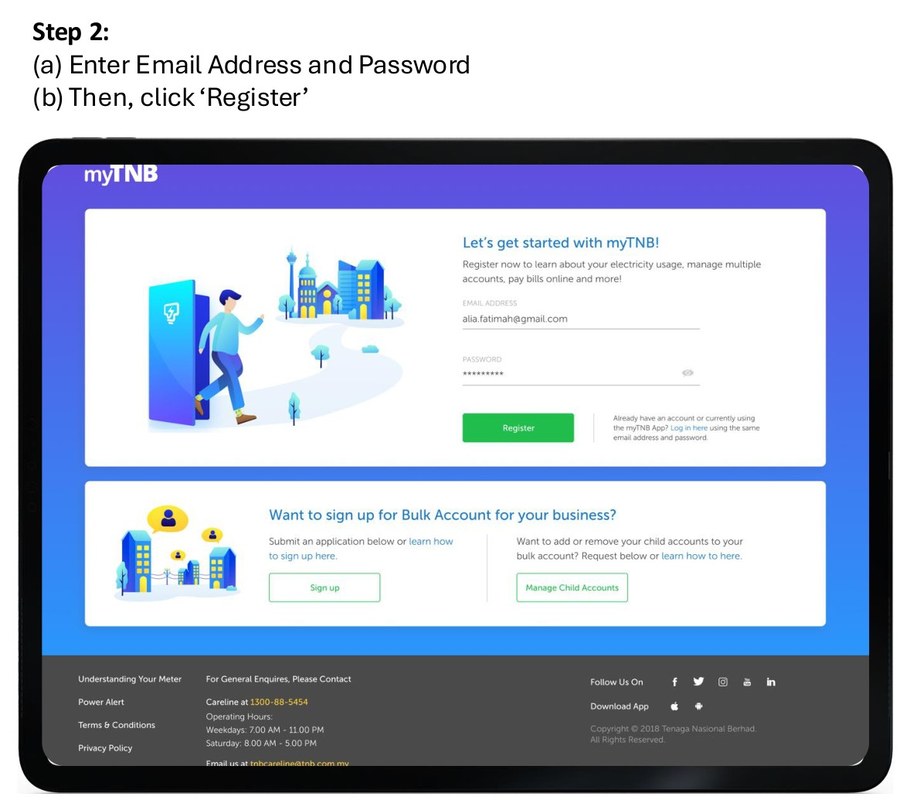
On the registration page, enter your email address and create a password for your myTNB account.
Once completed, select Register.
Step 3 – Enter Your User Details
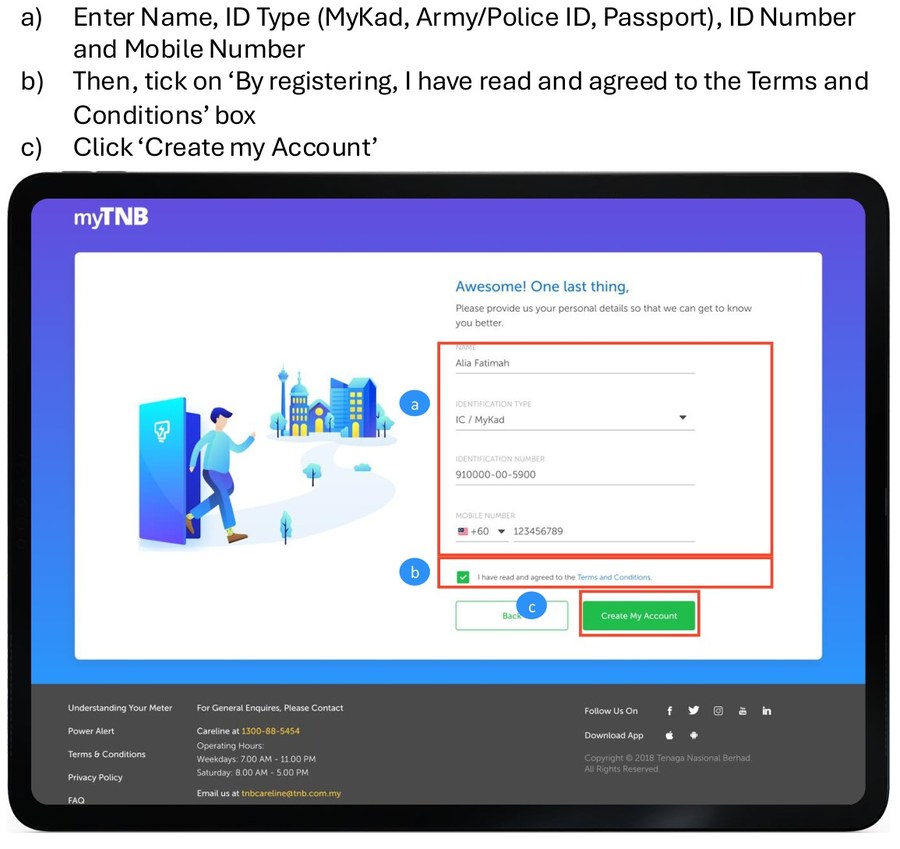
Complete the user information requested by myTNB.
- Name
- Identification type such as MyKad, Army/Police ID or Passport
- Identification number
- Mobile number
Make sure the information entered is correct. Then tick the Terms and Conditions agreement box and select Create my Account.
Step 4 – Enter the OTP
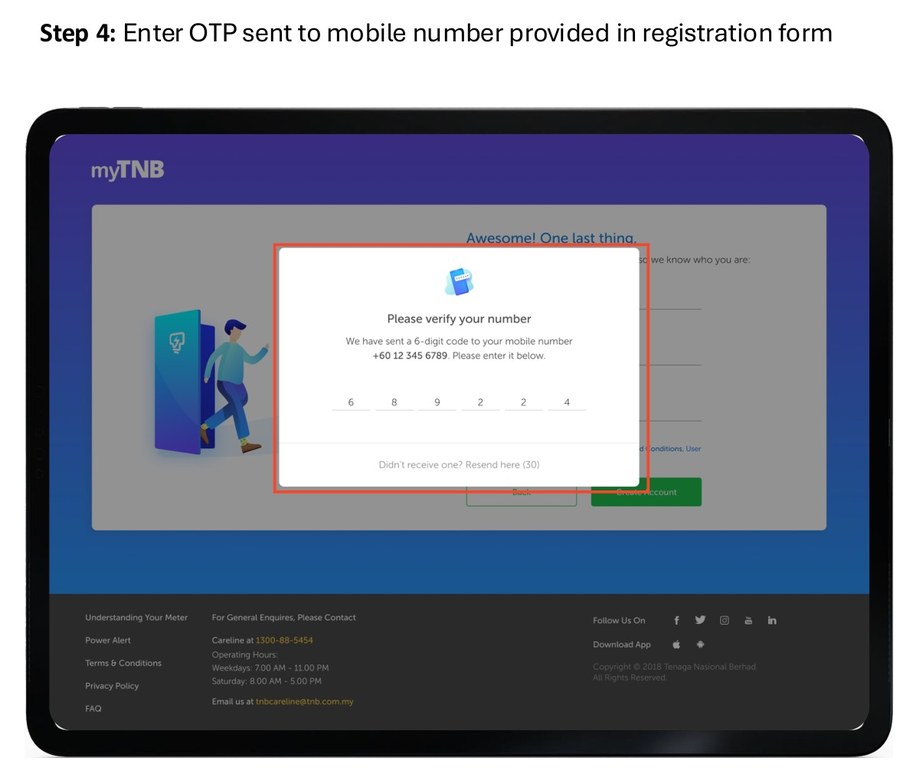
Enter the OTP sent to the mobile number provided during registration.
Make sure the mobile number can receive SMS so that you can complete the verification.
Step 5 – Your myTNB Account Is Created
After the OTP has been successfully verified, your myTNB account will be created.
However, you still need to verify your email address to activate the account.
Step 6 – Verify Your Email Address
Check the inbox of the email address used during registration.
Open the verification email from myTNB and select Verify Email Address.
Once the email verification is successful, your myTNB account will be activated and ready to use.
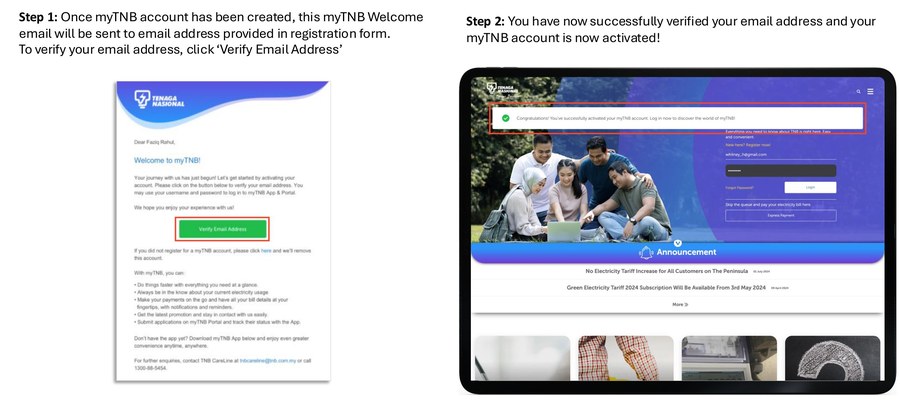
Log In to myTNB After Account Activation
Once your email address has been successfully verified, you can log in to myTNB using your registered email address and password.
👉 Log in through the official myTNB portal
Can I Use the myTNB App?
Yes. In addition to the web portal, myTNB services can also be accessed through the myTNB mobile application.
If you already have a myTNB account, use your registered account login details to access the relevant myTNB services.
The interface or location of certain options in the mobile app may differ from the web portal, so follow the instructions displayed on your screen.
What Can You Do After Registering for myTNB?
myTNB provides access to services related to electricity account management, usage, bill payments and other services available through the portal or application.
myTNB may also display applications, application status and actions that need to be completed by the customer.
Is myTNB Account Registration the Same as Verification?
No. Registering a myTNB account and completing verification for an application are different processes.
Account registration is used to create and activate your myTNB account, including OTP and email verification.
Application verification is a separate action that may be required when a verification status or instruction is displayed for an application in myTNB.
Need Help With Your myTNB Account?
If you have problems with myTNB registration, OTP, email verification or account-related verification, contact TNB for official assistance.
TNB CareLine: 1-300-88-5454
myTNB account registration, activation and customer identity verification are managed by TNB.
👉 Visit the official TNB CareLine page
FAQ
Where can I register a myTNB account?
You can register through the official myTNB registration page using your email address and the information requested during registration.
Is OTP enough to activate my myTNB account?
No. After the OTP is successfully verified and the account is created, you still need to complete email verification to activate your myTNB account.
Is account registration the same as myTNB application verification?
No. Account registration creates and activates your myTNB account. Application verification is a separate process that may be required when instructed by myTNB.
What should I do if I cannot register or verify my myTNB account?
Follow the instructions displayed in myTNB. If you are still unable to complete the process, contact TNB CareLine at 1-300-88-5454 for official assistance.
Need Help With a TNB Meter Application?
For information about applying for a new electricity supply and TNB meter, see our TNB meter application service.
📲 WhatsApp us for an initial review of your TNB meter application.