
Does your myTNB application show Verification Required or Acknowledgement Required?
This means there is an action that needs to be completed by the customer through their myTNB account before the application process can continue.
This guide explains how to complete myTNB verification and acknowledgement step by step using the myTNB web portal.
Don't have a myTNB account yet? See our guide on how to register a myTNB account first.
Note: The myTNB interface may change from time to time. Always follow the latest status and instructions displayed in your myTNB account.
How to Complete myTNB Verification
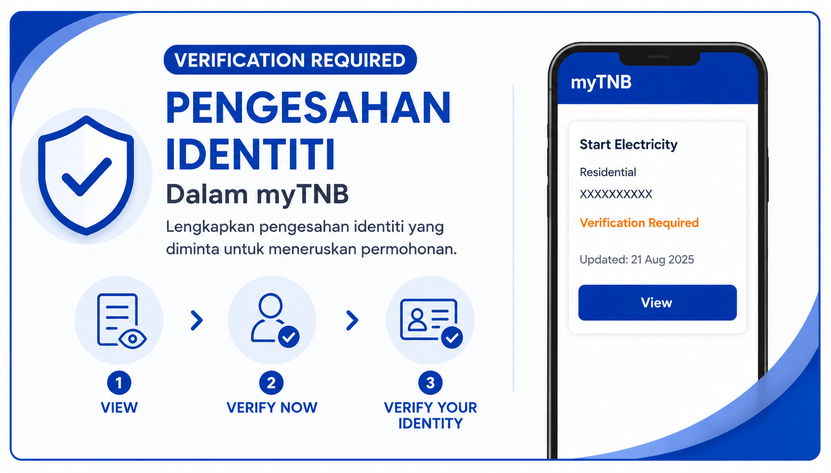
If your application status shows Verification Required, you need to complete the identity verification requested through myTNB.
Note: The guide and screenshots below use the myTNB web portal. If you are using the myTNB app, the interface or menu location may be different. Follow the status and instructions displayed in the app.
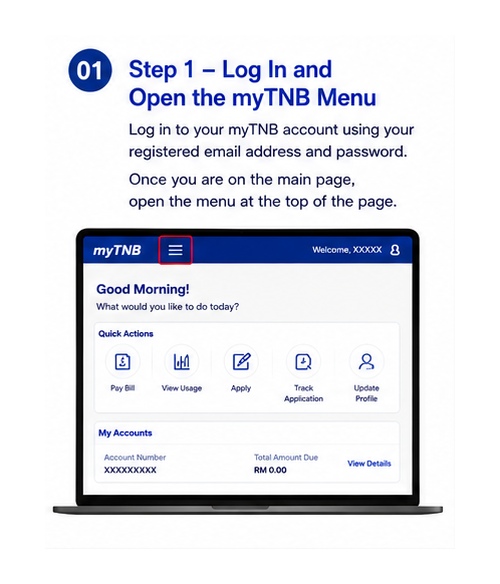
Step 1 – Log In and Open the myTNB Menu
Log in to your myTNB account using your registered email address and password.
Once you are on the main page, open the menu at the top of the page.
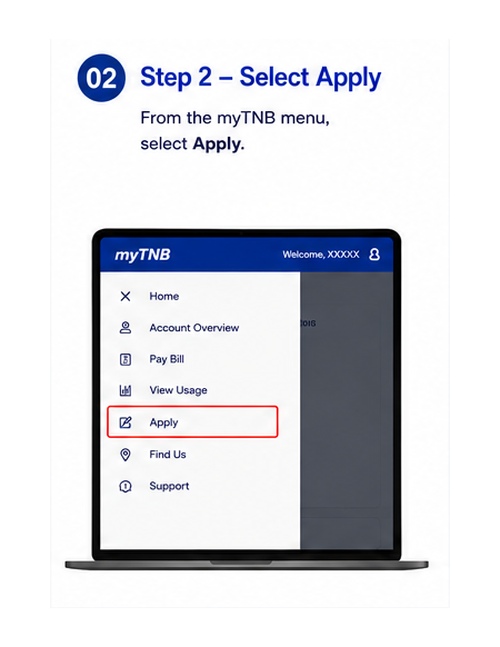
Step 2 – Select Apply
From the myTNB menu, select Apply.
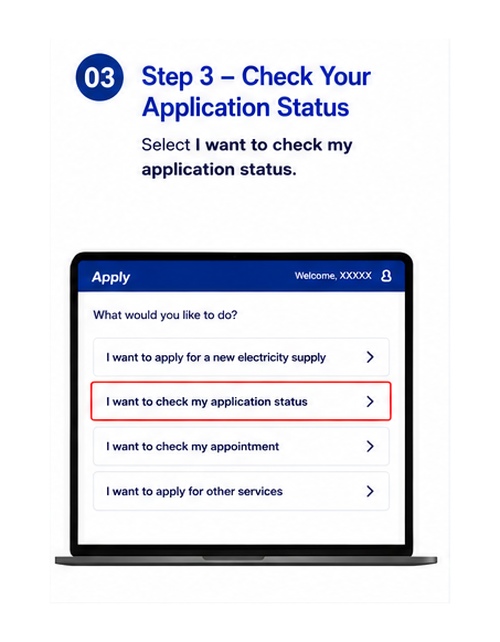
Step 3 – Check Your Application Status
Select I want to check my application status.
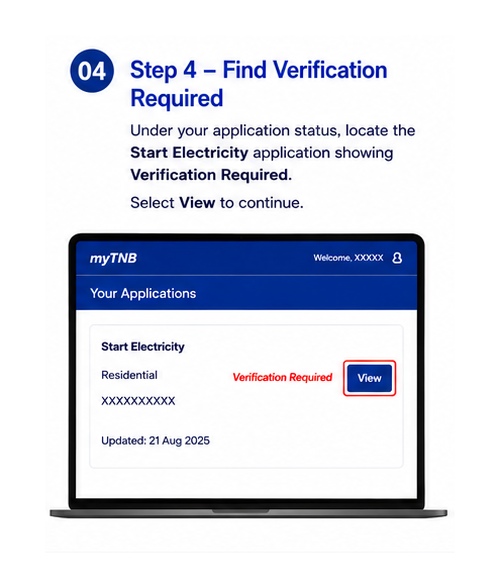
Step 4 – Find Verification Required
Under your application status, locate the Start Electricity application showing Verification Required.
Select View to continue.
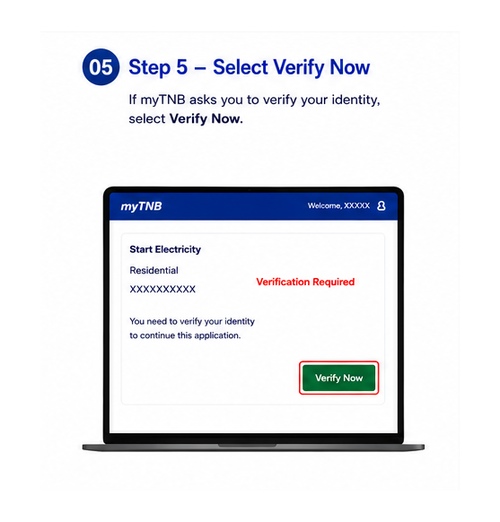
Step 5 – Select Verify Now
If myTNB asks you to verify your identity, select Verify Now.
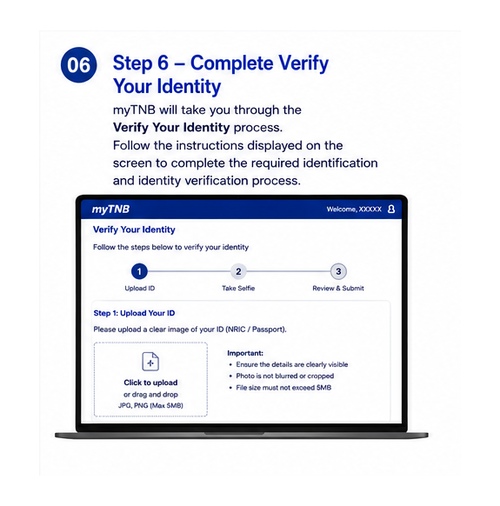
Step 6 – Complete Verify Your Identity
myTNB will take you through the Verify Your Identity process.
Follow the instructions displayed on the screen to complete the required identification and identity verification process.
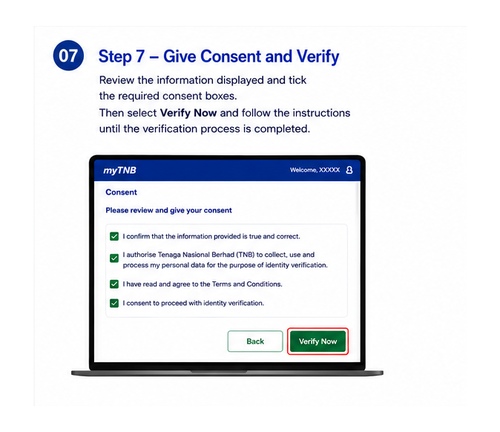
Step 7 – Give Consent and Verify
Review the information displayed and tick the required consent boxes.
Then select Verify Now and follow the instructions until the verification process is completed.
What Happens After myTNB Verification?
After completing the verification process, check your application status again in myTNB.
If the application later shows Acknowledgement Required, you need to complete the acknowledgement requested through myTNB.
How to Acknowledge a myTNB Application
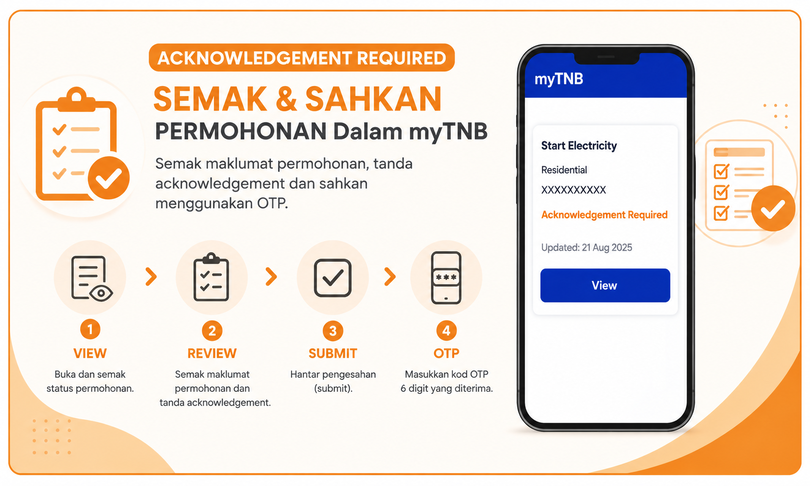
Acknowledgement is a separate action from identity verification.
You need to open the application, review the information displayed, complete the required acknowledgement and submit it through myTNB.
Note: The screenshots below use the myTNB web portal. The layout or menu location in the myTNB app may be different.
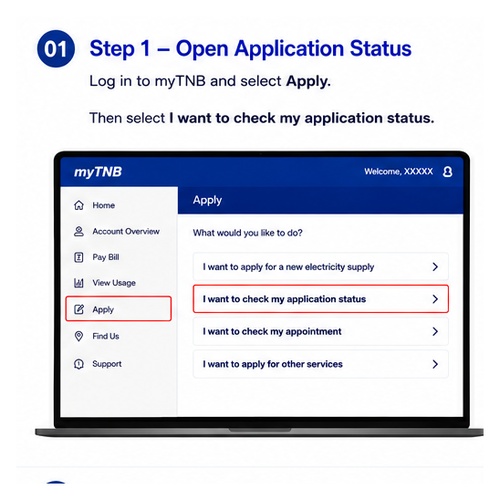
Step 1 – Open Application Status
Log in to myTNB and select Apply.
Then select I want to check my application status.
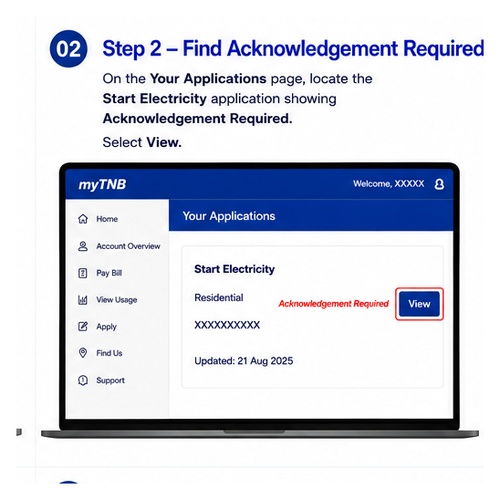
Step 2 – Find Acknowledgement Required
On the Your Applications page, locate the Start Electricity application showing Acknowledgement Required.
Select View.
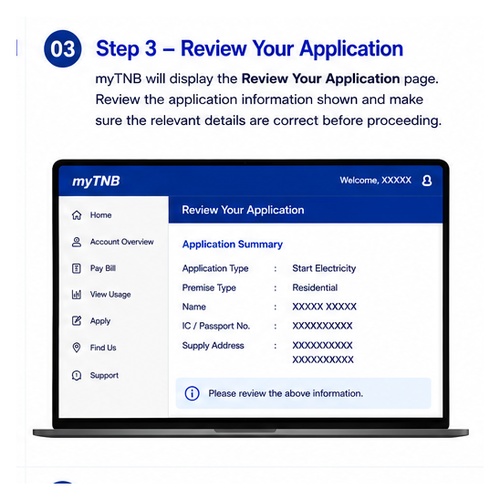
Step 3 – Review Your Application
myTNB will display the Review Your Application page.
Review the application information shown and make sure the relevant details are correct before proceeding.
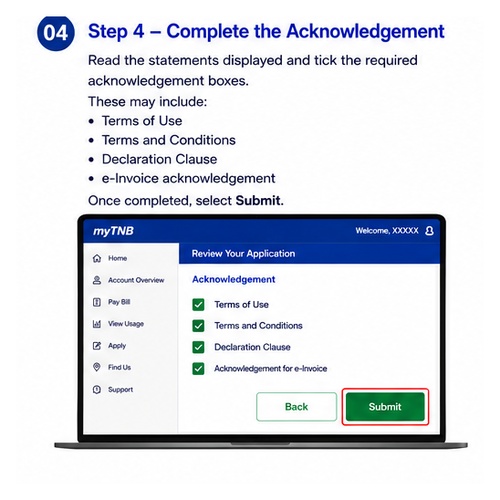
Step 4 – Complete the Acknowledgement
Read the statements displayed and tick the required acknowledgement boxes.
These may include:
- Terms of Use
- Terms and Conditions
- Declaration Clause
- e-Invoice acknowledgement
Once completed, select Submit.
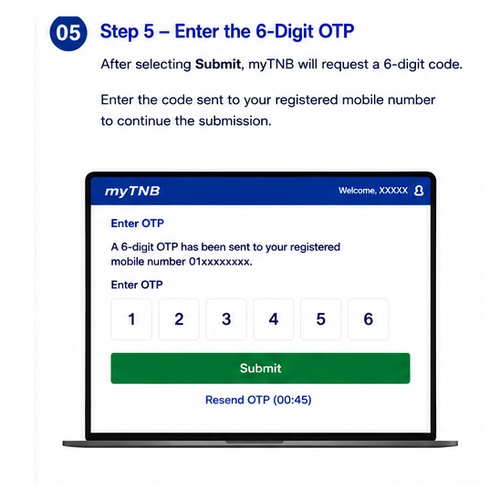
Step 5 – Enter the 6-Digit OTP
After selecting Submit, myTNB will request a 6-digit code.
Enter the code sent to your registered mobile number to continue the submission.
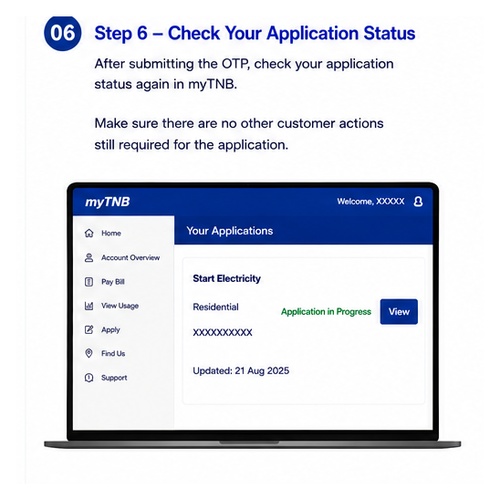
Step 6 – Check Your Application Status
After submitting the OTP, check your application status again in myTNB.
Make sure there are no other customer actions still required for the application.
Are Verification and Acknowledgement the Same?
No. Verification and acknowledgement are two different actions in myTNB.
- Verification Required – the customer needs to complete the required identity verification.
- Acknowledgement Required – the customer needs to review the application and complete the required acknowledgement.
Always follow the status displayed in myTNB because the required action may differ depending on the stage of your application.
Don't Have a myTNB Account?
If you do not have a myTNB account or have not completed account activation, register and activate your account first.
See our guide to registering a myTNB account for the registration, OTP and email verification steps.
Need Help With myTNB Verification or Your Account?
If you have problems logging in, registering your account or completing identity verification in myTNB, contact TNB for official assistance.
TNB CareLine: 1-300-88-5454
myTNB account management and customer identity verification are handled by TNB.
👉 Visit the official TNB CareLine page
FAQ
What does Verification Required mean in myTNB?
It means an identity verification action needs to be completed. Select View and follow the verification instructions displayed in myTNB.
What does Acknowledgement Required mean in myTNB?
It means the application requires acknowledgement from the customer. Open the application, review the details and complete the acknowledgement shown.
Why do I need an OTP when acknowledging the application?
After the acknowledgement is submitted, myTNB requests a 6-digit code sent to the registered mobile number to continue the submission.
What should I do if myTNB verification fails?
Check the instructions displayed in myTNB and try again. If you are still unable to complete the process, contact TNB CareLine at 1-300-88-5454 for official assistance.
Need Help With a TNB Meter Application?
For information about applying for a new electricity supply and TNB meter, see our TNB meter application service.
📲 WhatsApp us for an initial review of your TNB meter application.